
Share this post
To use Ellii as a student, your teacher must first invite you to a class. Here are some answers to frequently asked questions (FAQ) from students like you.
1. I'm new! How do I sign up with an email invitation?
Step #1
Go to your email inbox. Open your teacher’s invitation. Click Join Now.

Step #2
This will take you to ellii.com/students.
Step #3
Click the green box that says "Create an Account. I am new!"

Step #4
Fill out the form. Type your email address or create a username (don’t forget it). Is your username taken? (You didn't sign up already did you?) Choose a different username. Add a password. Don't forget it! Make sure your form has no errors (red boxes). Agree to the terms. Then click Create Student Account.

Step #5
Choose an avatar. Click Start Learning.
2. I'm new! My teacher gave me an invitation code. How do I sign up?
Step #1
Go to ellii.com/students.
Step #2
In the top right corner, choose New to Ellii? Create an Account.

Step #3
Fill out the form. Type the code your teacher gave you. Then fill out the rest of the form. See Step #4 and #5 above.
3. I have an account. How do I log in?
Step #1
Go to ellii.com/students.
Step #2
Enter your username or email address and password. (Use the one you used last time.)

Step #3
Click Log In.
Step #4
You are now on your Student Dashboard.
Important
Use this method every time you log in. Do not use your invitation email again.
4. How do I join my teacher’s class?
Your teacher will put you in a class. Ellii does not have a video platform for online classes. Ellii has the content and activities for class and homework. Use email or text to ask your teacher how you are going to meet online. Your teacher may choose a video platform such as Zoom or Google Hangouts.
In a video chat, your teacher can share his/her screen. You can do some Ellii tasks together. This tool is called Broadcast. Your teacher can also send you tasks to do for homework. You can do them on your mobile device, tablet, or computer and then send them to your teacher.
5. How do I see my homework?
Step #1
Log in at ellii.com/students.
Step #2
Enter your Username and Password.
Step #3
You are now on your Student Dashboard. This is where your Assignments are.

Step #4
Look at the To Do list. Do you see a lesson with a bell? This is your new homework.
Look at the Due Date. Do your homework before this day and time. (It is a good idea to click on the lesson to see how many tasks your teacher assigned.)
6. How do I do my homework?
Step #1
Log in at ellii.com/students.
Step #2
Click on the lesson in your To Do list.
Step #3
Choose a task you haven’t done yet (e.g., Listen & Type).

Step #4
Click Start.
Step #5
Read the instructions.
Step #6
Start the task.
Step #7
Do the task. Click the arrow at the bottom of your screen to go to the next question.
Step #8
Submit your answers.
Your teacher will be able to see your answers after you submit them. You can also try a task again! For some tasks, you can even fix your answers.
7. How do I see my results?
Step #1
After you finish each task, click I’m Finished or Submit (or advance the arrow).
Step #2
Click Review Answers.

Tasks with one correct answer (e.g., True or False) will show your results right away. Some tasks don’t have results (e.g., Read & Listen). Your teacher will need to check some of your written tasks.

Step #3
Click Try Again to redo the task.
Tip #1
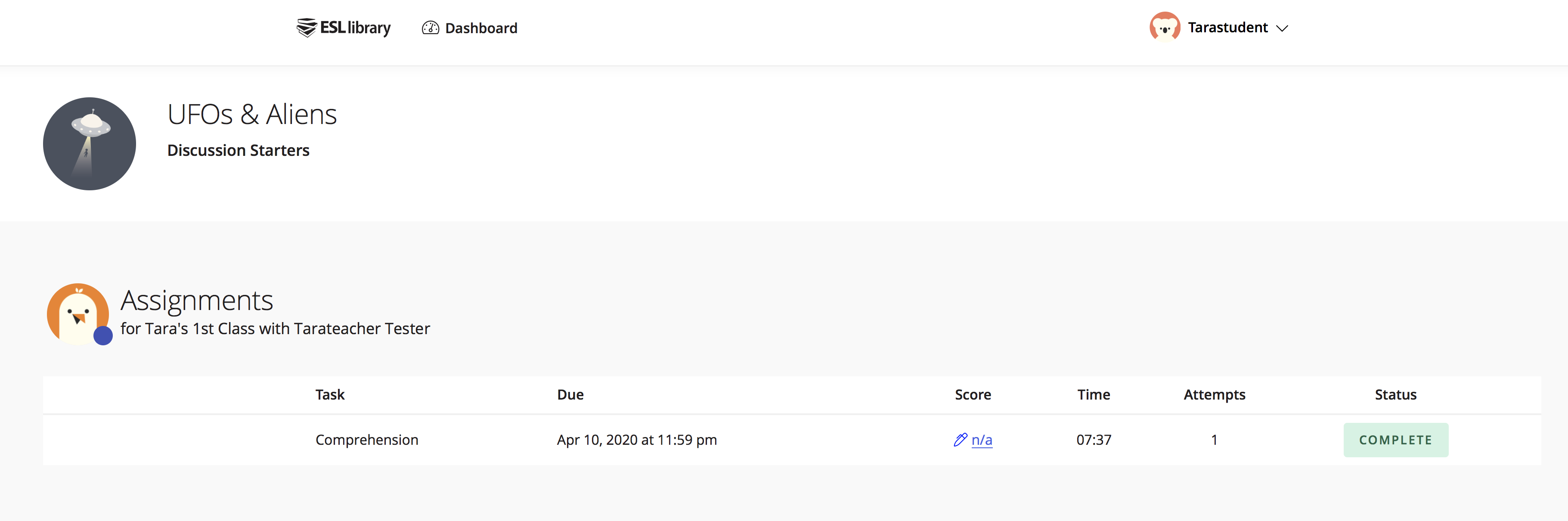
Your teacher will see your results and attempts (the number of times you tried a task). Your teacher will also see how much time you spent on each task. This is how your homework looks for your teacher. When your teacher clicks View Results, he or she sees your answers.

Tip #2
For some written answers, your teacher can send you feedback about your ESL Library homework. There is no Score, but you will see a pen notification on your dashboard if there is feedback. Click on the pen to see your teacher's feedback.
8. I forgot my username or password. What can I do?
Ask your teacher to check your username in his or her My Students list. Your teacher can reset your password there and tell you what it is. Log in with this new temporary password. Then go to My Profile and choose Change Password.
9. How do I ask more questions about Ellii?
You can write a question in the Comments. If it’s about using Ellii digital as a student, I will approve your question and answer it.
Follow along on our blog for more learning tips and mini‑lessons. Join us on Instagram for free mini‑lessons too!
Comments (31)

Randa A.(Student)
March 31, 2020 at 6:47 pm

Tara B(Ellii Staff)
April 1, 2020 at 1:24 pm

Amira A.(Teacher)
April 6, 2020 at 9:24 pm

Tara Benwell(Author)
April 7, 2020 at 1:15 pm

Stephanie V.(Teacher)
April 8, 2020 at 6:53 pm
Tara Benwell(Author)
April 9, 2020 at 12:30 pm
Stephanie V.(Teacher)
April 9, 2020 at 3:22 pm
Stephanie V.(Teacher)
April 9, 2020 at 3:25 pm

Tarateacher T.(Teacher)
April 9, 2020 at 5:12 pm
Tara Benwell(Author)
April 9, 2020 at 5:12 pm
Stephanie V.(Teacher)
April 14, 2020 at 1:27 pm

Meredith P.(Teacher)
April 14, 2020 at 9:02 pm
Tara Benwell(Author)
April 15, 2020 at 1:30 pm

Marianne Y.(Teacher)
April 15, 2020 at 11:30 pm
Tara Benwell(Author)
April 16, 2020 at 12:34 am

William Tian(Guest)
April 17, 2020 at 2:18 am
Tammy Wik(Ellii Staff)
May 4, 2020 at 5:07 pm

Marilyn H.(Teacher)
April 21, 2020 at 4:38 pm
Tara Benwell(Author)
April 23, 2020 at 2:10 pm
Marilyn H.(Teacher)
April 21, 2020 at 9:21 pm
Tara Benwell(Author)
April 23, 2020 at 2:03 pm
Miriam Marroquin(Guest)
April 24, 2020 at 10:10 pm

Salvador C.(Teacher)
April 26, 2020 at 3:37 am
Tara Benwell(Author)
April 27, 2020 at 1:00 am

Tsering M.(Teacher)
May 3, 2020 at 5:12 pm
Tammy Wik(Ellii Staff)
May 4, 2020 at 5:22 pm

Bahar H.(Teacher)
May 5, 2020 at 4:28 pm
Tammy Wik(Ellii Staff)
May 5, 2020 at 4:47 pm
Elena Brotto(Guest)
May 6, 2020 at 3:35 pm
Tammy Wik(Ellii Staff)
May 6, 2020 at 5:40 pm
Rajnarain S.(Student)
June 9, 2020 at 1:55 pm
Tammy Wik(Ellii Staff)
June 9, 2020 at 6:25 pm
Stephanie V.(Teacher)
June 30, 2020 at 1:32 pm
Tara B(Ellii Staff)
July 3, 2020 at 1:06 pm

Thuan N.(Student)
September 15, 2020 at 8:52 pm

Angela H.(Teacher)
September 18, 2020 at 4:00 pm
Tammy Wik(Ellii Staff)
September 18, 2020 at 5:32 pm
Carla Sierra(Guest)
September 23, 2020 at 8:51 am
Tammy Wik(Ellii Staff)
September 30, 2020 at 4:53 pm
Li Chen(Guest)
October 8, 2020 at 3:05 am
Tammy Wik(Ellii Staff)
October 9, 2020 at 10:47 pm

Valerie S.(Teacher)
October 18, 2020 at 6:58 pm
Tammy Wik(Ellii Staff)
October 27, 2020 at 4:42 pm

Christine N.(Teacher)
October 23, 2020 at 7:02 pm
Tammy Wik(Ellii Staff)
October 27, 2020 at 4:43 pm
Adrian V.(Teacher)
November 12, 2020 at 8:26 pm
Tammy Wik(Ellii Staff)
November 17, 2020 at 7:40 pm
Ahmet Albayrak (Guest)
December 15, 2020 at 5:52 am
Tammy Wik(Ellii Staff)
December 17, 2020 at 6:18 pm

William A.(Teacher)
September 13, 2021 at 6:11 pm

Lei Kayanuma(Ellii Staff)
September 13, 2021 at 6:47 pm
Nancy E.(Teacher)
September 20, 2021 at 4:44 pm
Lei Kayanuma(Ellii Staff)
September 21, 2021 at 3:30 pm
Teacher A.(Student)
November 30, 2021 at 5:15 pm
Tara Benwell(Author)
December 2, 2021 at 4:42 pm
Elaheh S.(Student)
March 24, 2022 at 12:40 am
Tara Benwell(Author)
March 28, 2022 at 12:51 pm

Faina M.(Student)
September 12, 2022 at 1:19 pm
Tara Benwell(Author)
September 12, 2022 at 8:52 pm

Mario L.(Teacher)
November 21, 2023 at 9:57 am
Tara Benwell(Author)
November 21, 2023 at 2:21 pm